Install Canoeboot on Gigabyte GA-G41M-ES2L
| Specifications | |
|---|---|
| Manufacturer | Gigabyte |
| Name | GA-G41M-ES2L |
| Released | 2009 |
| Chipset | G41 |
| CPU | LGA775, Core 2 Duo+Quad |
| Graphics | GMA X4500 |
| Memory | 8GB DDR2 SODIMMs (2x4GB) |
| Architecture | x86-64-v1 |
| Original boot firmware | AWARD BIOS |
| Intel ME/AMD PSP | Present, Fully removable |
| Flash chip | SOIC-8 2x 1MB/8Mbit |
Get the ROM image
Download from release
Build from source
The build target, when building from source, is thus:
./mk -b coreboot gigabyte_ga_g41m_es2l_2mb_biosInternal/Software Flashing
There are 2 flash chips (one is backup).
1st & 2nd chip:
./flashprog -p internal:dualbiosindex=0

./flashprog -p internal:dualbiosindex=1Warning: If you don’t flash both chips, the recovery program from the default factory BIOS will kick in and your board will be soft bricked. Make sure that you flash both chips!
Follow the guide with internal:dualbiosindex= to backup and flash the canoeboot.rom to both flash chips
Otherwise you can still boot the system with just the main flash chip connected, after desoldering the backup chip. This has been tested while Canoeboot was already installed onto the main chip.
External/Hardware Flashing
You can only externally reprogram one of the chips at a time, and you need to disable the chip that you’re not flashing, by connecting 3v3 to /CS of that chip, so you will actually need second test clip or IC pin mini grabber.
The flash shares a common voltage plane with the southbridge, which draws a lot of current. This will cause under-voltage on most SPI flashers, so do not use the 3.3V rail from your flasher. Do not connect +3.3V to the chip. Instead, turn the board on and then turn it off by holding the power button. With the board powered down, but plugged in, there will be a 3.3V supply from the ATX PSU. You can then flash, but DO NOT connect the +3.3V supply from your SPI flasher!
NOTE: You should use a resistor in series, between 1K to 10K ohms, for the 3.3v connection to the CS pin. This is to protect from over-current.
Here is an image of the flash chip:
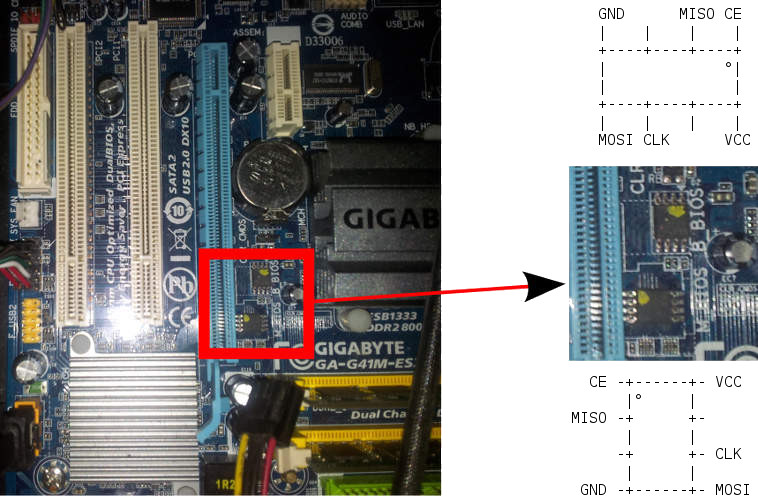
Check the hw-flashing guide before moving onto the next step below.
Flash it: (With rpi-pico as an example, edit the line if needed.)
flashprog -p serprog:dev=/dev/ttyACM0,spispeed=16M -w filename.romMemory Modules (might be Outdated)
[link]This board is very picky with RAM. If it doesn’t boot, try an EHCI debug dongle, serial usb adapter and null modem cable, or spkmodem, to get a coreboot log to see if it passed raminit.
Kingston 8 GiB Kit KVR800D2N6/8G with Elpida Chips E2108ABSE-8G-E
this is a 2x4GB setup and these work quite well, according to a user on IRC.
Nanya NT2GT64U8HD0BY-AD with 2 GiB of NT5TU128M8DE-AD chips works too.
Many other modules will probably work just fine, but raminit is very picky on this board. Your mileage will fluctuate, wildly.
Removed GRUB (might be Outdated)
As of Canoeboot release 20221214, only SeaBIOS payload is provided in ROMs for this board. According to user reports, they work quite well. GRUB was always buggy on this board, so it was removed from cbmk.
SATA in IDE emulation (might be Outdated)
IDE on the board is untested, but it might be possible to use a SATA HDD using an IDE SATA adapter. The SATA ports do work, but it’s IDE emulation. The emulation is slow in DMA mode sia SeaBIOS, so SeaBIOS is configured to use PIO mode on this board. This SeaBIOS configuration does not affect the Linux kernel.
Fan control issue (might be Outdated)
PWM fan speed is not changing in depend of CPU temperature based on SuperIO fan control
Expanded_Specifications
Markdown file for this page: https://canoeboot.org/docs/install/ga-g41m-es2l.md
This HTML page was generated by the Canoeboot Static Site Generator.